AP SMC Elections 2026-27: Voters List, Notification & Parent Invitation Generator
AP SMC ఎన్నికలు 2026-27: ఓటర్ల జాబితా, నోటిఫికేషన్ & తల్లిదండ్రుల ఆహ్వాన పత్రాల జనరేటర్
Generate Voters List PDF, Telugu & English Election Notifications, and Personalized Parent Invitations from UDISE+ Active Students Excel
The AP School Management Committee (SMC) Elections for 2026-27 are approaching. As per the schedule, the provisional voter list must be displayed on the school notice board on the 18th, and parent invitations must be distributed to ensure maximum participation. This article explains how to use the iBadi SMC Elections Generator to create all documents in minutes.
🚀 ఇప్పుడే SMC Voter List, Invitation జనరేటర్ ఓపెన్ చేయండి | Open SMC Generator Now(Click Here)
📋 దశల వారీ గైడ్: SMC ఎన్నికల పత్రాలను తయారు చేయడం | Step-by-Step Guide
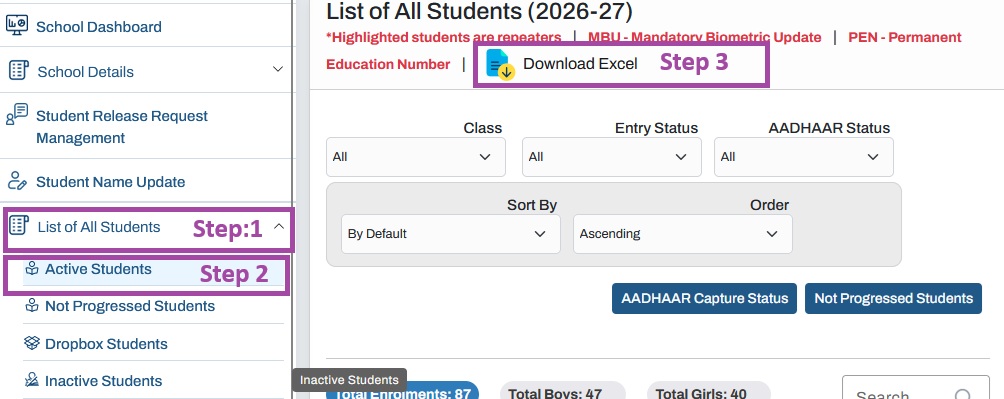
Step 1: UDISE+ ఆక్టివ్ స్టూడెంట్స్ ఎక్సెల్ ఫైల్ను డౌన్లోడ్ చేయండి | Download UDISE+ Active Students Excel
- మీ పాఠశాల User ID మరియు Password తో UDISE+ స్టూడెంట్ మాడ్యూల్లో లాగిన్ అవ్వండి.
Login to UDISE+ Student Module with your School User ID and Password. - ఎడమ వైపు మెనూలో List of All Students పై క్లిక్ చేయండి.
Click on “List of All Students” in the left-side menu. - Active Students ఎంచుకోండి.
Select “Active Students”. - కుడి వైపు ఉన్న Download Excel ఐకాన్ పై క్లిక్ చేయండి.
Click on the “Download Excel” icon on the right side. - ఫైల్ను సేవ్ చేయండి. ఎలాంటి మార్పులు చేయవద్దు.
Save the file. Do not make any changes.
Step 2: ఎక్సెల్ ఫైల్ను జనరేటర్కు అప్లోడ్ చేయండి | Upload Excel to Generator
- iBadi SMC ఎన్నికల జనరేటర్ తెరవండి:
ibadi.in/SMC/smc-elections-generator.html
Open the iBadi SMC Elections Generator. - మీ పాఠశాల వివరాలను నమోదు చేయండి (లేదా టూల్ స్వయంగా గుర్తిస్తుంది).
Enter your School Details (or the tool auto-detects). - Choose File పై క్లిక్ చేయండి లేదా ఎక్సెల్ ఫైల్ను డ్రాగ్ చేసి వదలండి.
Click “Choose File” or drag and drop the Excel file. - Process the Data లేదా Generate పై క్లిక్ చేయండి.
Click “Process the Data” or “Generate”.
Step 3: సమీక్షించి PDFలను తయారు చేయండి | Review & Generate PDFs
డేటా ప్రాసెస్ అయిన తర్వాత, మీకు ఓటర్ల జాబితా ప్రివ్యూ కనిపిస్తుంది. ధృవీకరించి, ఈ క్రింది వాటిని తయారు చేయండి:
After data is processed, you will see a preview of the Voters List. Verify and generate:
- ఓటర్ల జాబితా PDF (A4 ల్యాండ్స్కేప్, ఒక పేజీకి 16 రికార్డులు)
Voters List PDF (A4 Landscape, 16 records per page) - నోటిఫికేషన్ PDF (తెలుగు & ఇంగ్లీష్)
Notification PDF (Telugu & English) - ఆహ్వాన పత్రం PDF (అక్నాలెడ్జ్మెంట్ స్లిప్తో, ఒక పేజీకి 3)
Invitation PDF (with acknowledgement slip, 3 per page)
Step 4: పంపిణీ చేయండి మరియు ప్రదర్శించండి | Distribute & Display
- 18 సెప్టెంబర్ 2026న పాఠశాల నోటీసు బోర్డులో ప్రొవిజినల్ ఓటర్ల జాబితాను ప్రదర్శించండి.
Display the Provisional Voters List on the school notice board on 18th September 2026. - ఎన్నికల తేదీ (29 సెప్టెంబర్ 2026) గురించి తెలియజేస్తూ తల్లిదండ్రులందరికీ ఆహ్వాన పత్రాలను పంపిణీ చేయండి.
Distribute invitation letters to all parents informing them about the election date (29 September 2026). - తల్లిదండ్రుల గ్రూపులకు WhatsApp షేర్ ఫీచర్ను ఉపయోగించండి.
Use the WhatsApp Share feature for parent groups.
🔧 iBadi AP SMC ఎన్నికల జనరేటర్ అంటే ఏమిటి? | What is the iBadi AP SMC Elections Generator?
iBadi AP SMC ఎన్నికలు 2026-27 జనరేటర్ అనేది ఉచిత వెబ్ ఆధారిత సాధనం. ఇది మీ పాఠశాల UDISE+ ఆక్టివ్ స్టూడెంట్స్ ఎక్సెల్ ఫైల్ను ఇన్పుట్గా తీసుకొని, ఆటోమేటిక్గా ఈ క్రింది వాటిని తయారు చేస్తుంది:
- 📄 ప్రొవిజినల్ ఓటర్ల జాబితా PDF (విద్యార్థుల పేర్లు, తల్లిదండ్రుల పేర్లు, PEN, తరగతి)
Provisional Voters List PDF (Student names, Parent names, PEN, Class) - 📢 ఎన్నికల నోటిఫికేషన్ – తెలుగు మరియు ఇంగ్లీష్ రెండింటిలో
Election Notification – in both Telugu and English - ✉️ వ్యక్తిగతీకరించిన తల్లిదండ్రుల ఆహ్వాన పత్రాలు (ఒక పేజీకి 3, అక్నాలెడ్జ్మెంట్ రసీదుతో)
Personalized Parent Invitation Letters (3 per page, with detachable acknowledgement receipt)
🔒 గోప్యత: మొత్తం డేటా మీ బ్రౌజర్లోనే ప్రాసెస్ అవుతుంది. మీ విద్యార్థుల ఎక్సెల్ ఫైల్ ఏ సర్వర్కూ అప్లోడ్ అవ్వదు.
⚖️ iBadi SMC జనరేటర్ను ఎందుకు ఉపయోగించాలి? | Why Use the iBadi SMC Generator?
| మాన్యువల్ పని Manual Work |
iBadi జనరేటర్ ఉపయోగించి Using iBadi Generator |
|---|---|
| గంటల తరబడి టైపింగ్ మరియు ఫార్మాటింగ్ Hours of typing and formatting |
✅ 2 నిమిషాల్లో సిద్ధం Ready in 2 minutes |
| పేర్లు మరియు PENలో తప్పులు Errors in names and PEN |
✅ UDISE+ నుండి ఖచ్చితమైన డేటా Accurate data from UDISE+ |
| ప్రతి విద్యార్థికి విడిగా లేఖలు Separate letters for each student |
✅ వ్యక్తిగతీకరణతో బల్క్ జనరేషన్ Bulk generation with personalization |
| భాషా అడ్డంకులు Language barriers |
✅ ద్విభాషా (తెలుగు & ఇంగ్లీష్) అవుట్పుట్ Bilingual (Telugu & English) output |
| గోప్యత ఆందోళనలు Privacy concerns |
✅ డేటా బ్రౌజర్లోనే ప్రాసెస్ Data processed in browser only |
⚠️ ముఖ్యమైన ధృవీకరణ గమనిక: ఓటర్ల జాబితాను ఖరారు చేసే ముందు విద్యార్థుల పేర్లు, తల్లిదండ్రుల పేర్లు, తరగతి, అడ్మిషన్ నంబర్ మరియు ఓటరు అర్హతను అధికారిక పాఠశాల రికార్డులతో తప్పనిసరిగా సరిపోల్చి చూడండి. ఈ జనరేటర్ ఒక సహాయక సాధనం మాత్రమే.
⚠️ Important Verification Note: Before finalizing the voters list, always cross-verify student names, parent/guardian names, class, admission number, and voter eligibility with official school records. This generator is an aid, not a replacement for official verification.
❓ తరచుగా అడిగే ప్రశ్నలు (FAQs) | Frequently Asked Questions
Q1: నా విద్యార్థుల డేటా సురక్షితమా? | Is my student data safe?
అవును. ఈ టూల్ ఎక్సెల్ ఫైల్ను మీ బ్రౌజర్లోనే ప్రాసెస్ చేస్తుంది. ఏ డేటా సర్వర్కూ అప్లోడ్ అవ్వదు.
Yes. The tool processes the Excel file locally in your browser. No data is uploaded to any server.
Q2: తయారు చేసిన PDFలను నేను మార్చగలనా? | Can I edit the generated PDFs?
PDFలు నేరుగా మీ ఎక్సెల్ డేటా నుండి తయారవుతాయి. మార్పులు కావాలంటే, అప్లోడ్ చేయడానికి ముందు ఎక్సెల్ ఫైల్ను సవరించండి.
The PDFs are generated directly from your Excel data. To make changes, edit the Excel file before uploading.
Q3: నా పాఠశాలలో 500 కంటే ఎక్కువ విద్యార్థులు ఉంటే? | What if my school has more than 500 students?
ఈ టూల్ పెద్ద డేటాసెట్లను నిర్వహించడానికి రూపొందించబడింది. ఓటర్ల జాబితా ఆటోమేటిక్గా పేజీలుగా విభజించబడుతుంది (ఒక పేజీకి 16 రికార్డులు).
The tool is designed to handle large datasets. The voters list is automatically paginated (16 records per page).
Q4: ఈ టూల్ కోసం డబ్బు చెల్లించాలా? | Do I need to pay for this tool?
లేదు. ఇది AP పాఠశాలల ప్రయోజనం కోసం రూపొందించిన ఉచిత సాధనం.
No. It is a free utility created for the benefit of AP schools.
Q5: అధికారిక SMC ఎన్నికల షెడ్యూల్ ఎక్కడ చూడగలను? | Where can I find the official SMC election schedule?
ఆంధ్రప్రదేశ్ పాఠశాల విద్యా శాఖ నుండి తాజా ఉత్తర్వులను చూడండి. షెడ్యూల్లో 18వ తేదీ (ప్రొవిజినల్ జాబితా) మరియు 29 సెప్టెంబర్ 2026 (ఎన్నికల రోజు) వంటి ముఖ్య తేదీలు ఉంటాయి.
Refer to the latest proceedings from the Department of School Education, AP. The schedule mentions key dates like 18th (provisional list) and 29th September 2026 (election day).
Q6: జనరేటర్ను ఎలా యాక్సెస్ చేయాలి? | How do I access the generator?
ఇక్కడ సందర్శించండి:
Visit: https://ibadi.in/SMC/smc-elections-generator.html
✅ ముగింపు | Conclusion
AP SMC ఎన్నికలు 2026-27ను iBadi SMC ఎన్నికల జనరేటర్ సహాయంతో సజావుగా నిర్వహించవచ్చు. ఓటర్ల జాబితా, నోటిఫికేషన్ మరియు ఆహ్వాన ప్రక్రియను ఆటోమేట్ చేయడం ద్వారా, పాఠశాలలు విలువైన సమయాన్ని ఆదా చేసుకోవచ్చు మరియు తప్పులు లేని పత్రాలను నిర్ధారించుకోవచ్చు. UDISE+ డౌన్లోడ్ దశలను అనుసరించండి, ఎక్సెల్ ఫైల్ను అప్లోడ్ చేయండి, మరియు మీ ఎన్నికల పత్రాలను నిమిషాల్లో సిద్ధం చేసుకోండి.
The AP SMC Elections 2026-27 can be conducted smoothly with the help of the iBadi SMC Elections Generator. By automating the voters list, notification, and invitation process, schools can save valuable time and ensure error-free documents. Follow the UDISE+ download steps, upload the Excel file, and get all your election materials ready in minutes.
ఉచితం • గోప్యతా సురక్షితం • తెలుగు & ఇంగ్లీష్ | Free • Privacy-Safe • Telugu & English